Custom Residential Smart Home Specialist

Smart Home
Engineering.

A 1,400-entity Apple-grade home in London — designed, built, and commissioned end-to-end. Whole-home integration across lighting, climate, AV, energy, and security.

Try a scene →

3610 K · daytime balance

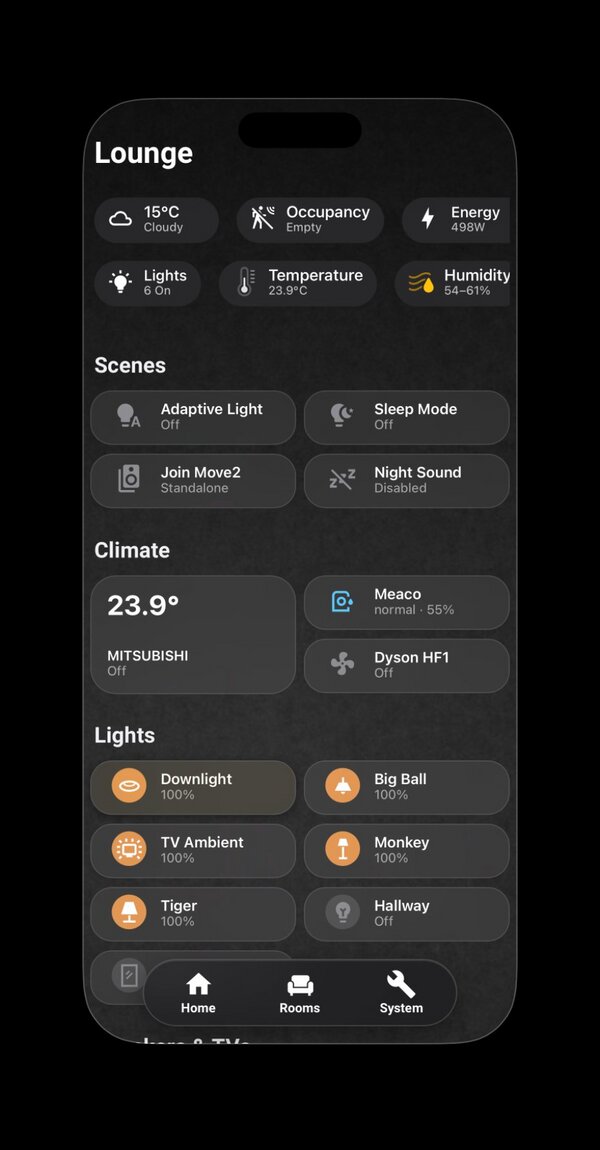
Lounge view of the dashboard, showing climate, scenes, and tunable-white lights

At a Glance

What this project is, in numbers.

A self-directed project built to demonstrate three things relevant to high-end residential integration: that I can think in whole systems, communicate technical decisions in plain language, and deliver to a premium standard of polish.

The Dashboard

One design language, six rooms.

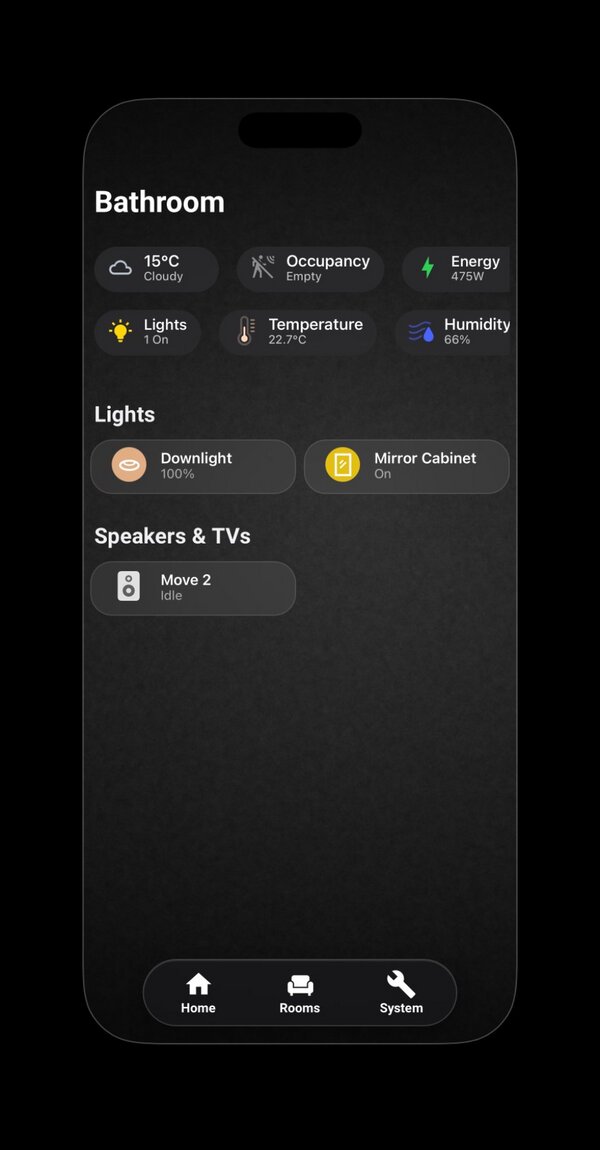
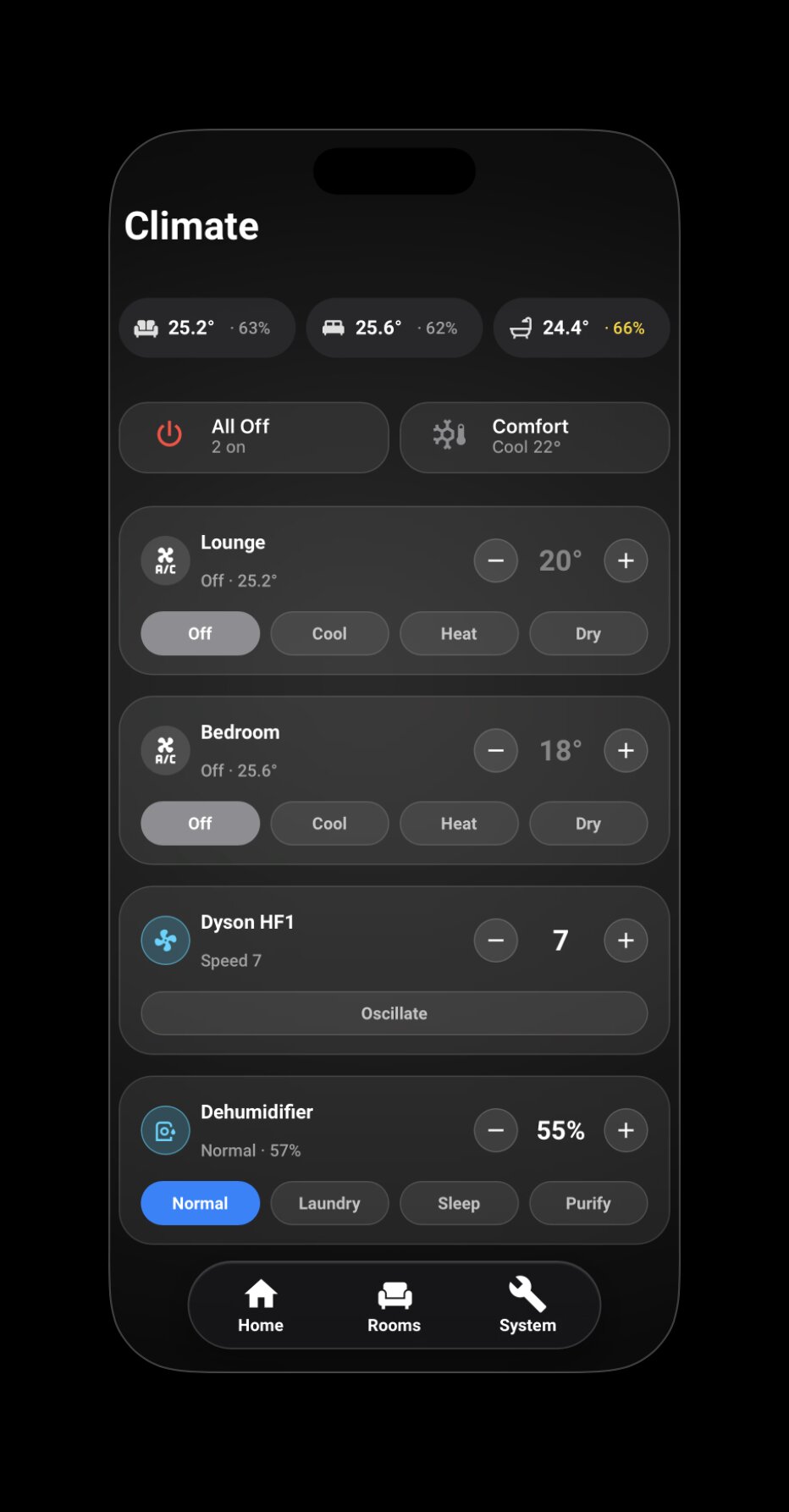
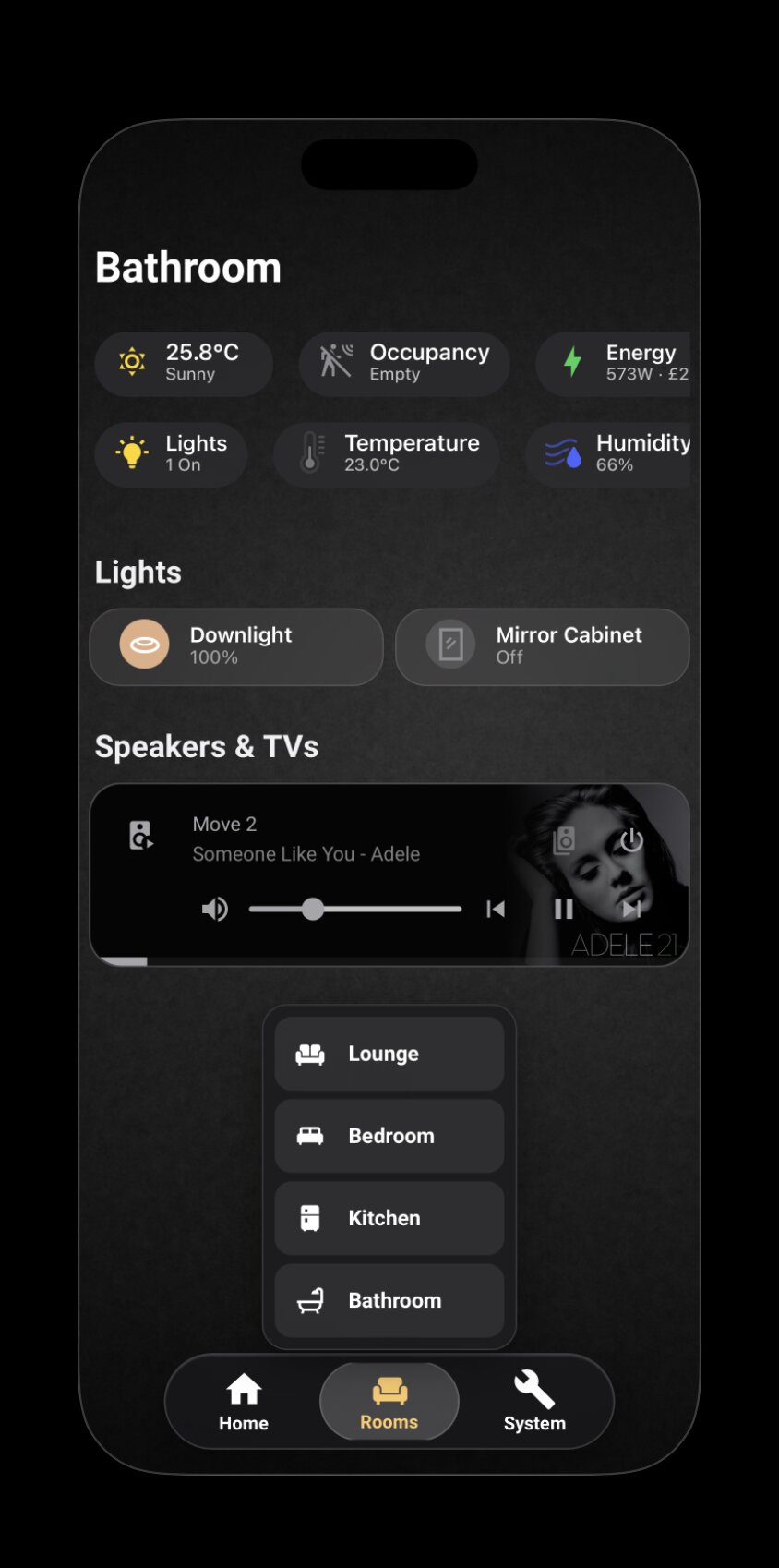
Each room follows the same structure — status bar, contextual controls, fixed dock — but the content respects the room. Kitchen tracks appliances, Lounge centres on media, Bathroom stays minimal.

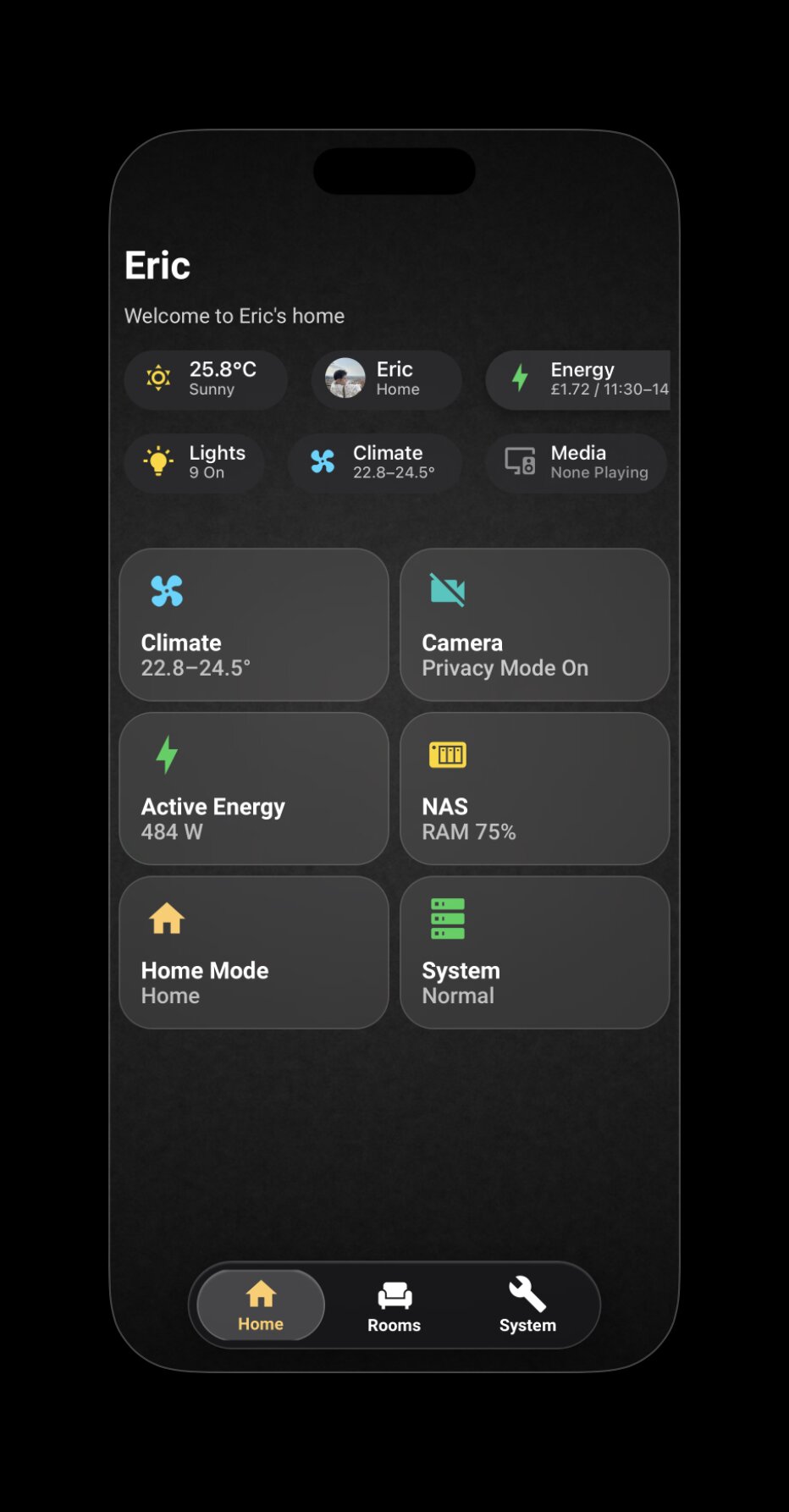
Home view — the entry point, with weather, identity, lights, climate, camera privacy, and system status all at a glance
Home — the entry point. Six tiles cover the dimensions a high-end client actually asks about: climate, security, energy, system health. Everything else lives one tap away.
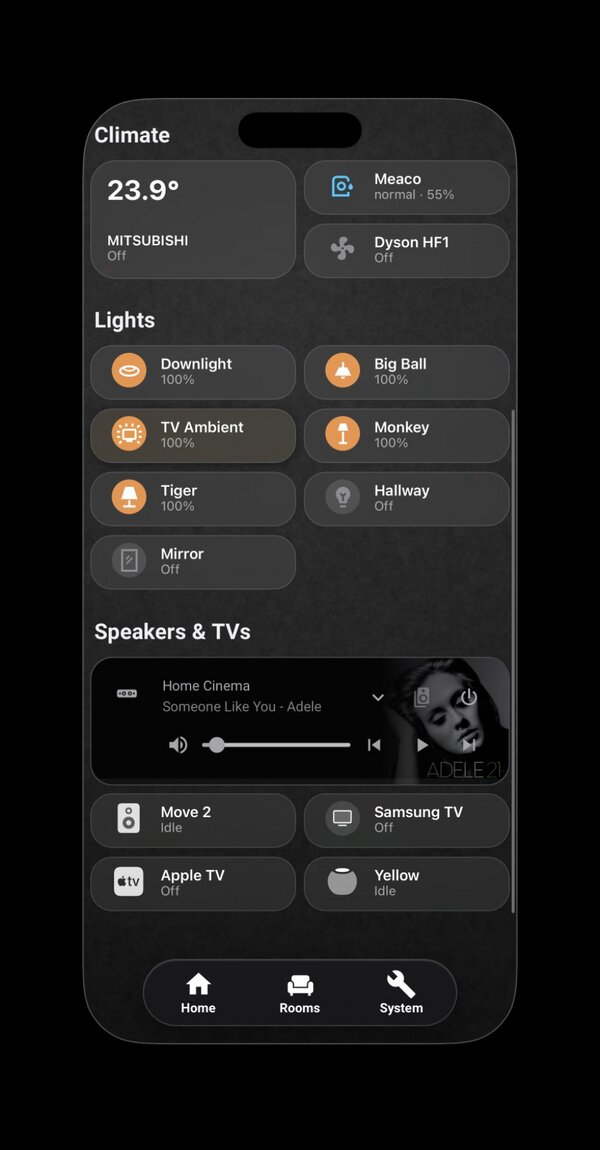
Lounge view
Lounge · Climate, Dyson HF1, six tunable-white lights, media.
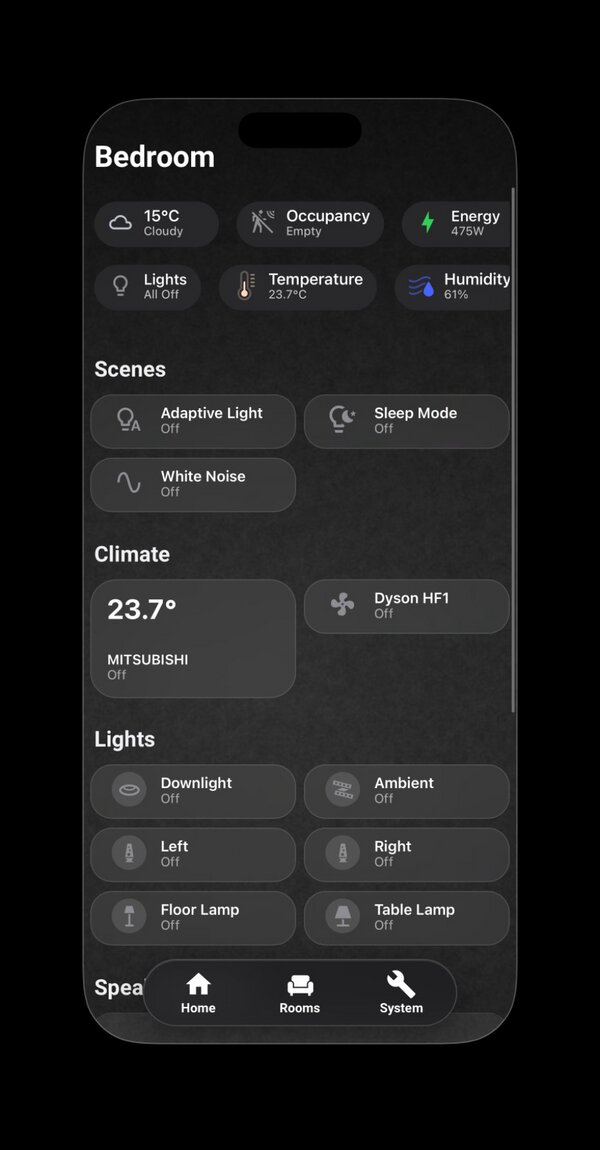
Bedroom view
Bedroom · Bedside lamp control, White Noise scene, AC.
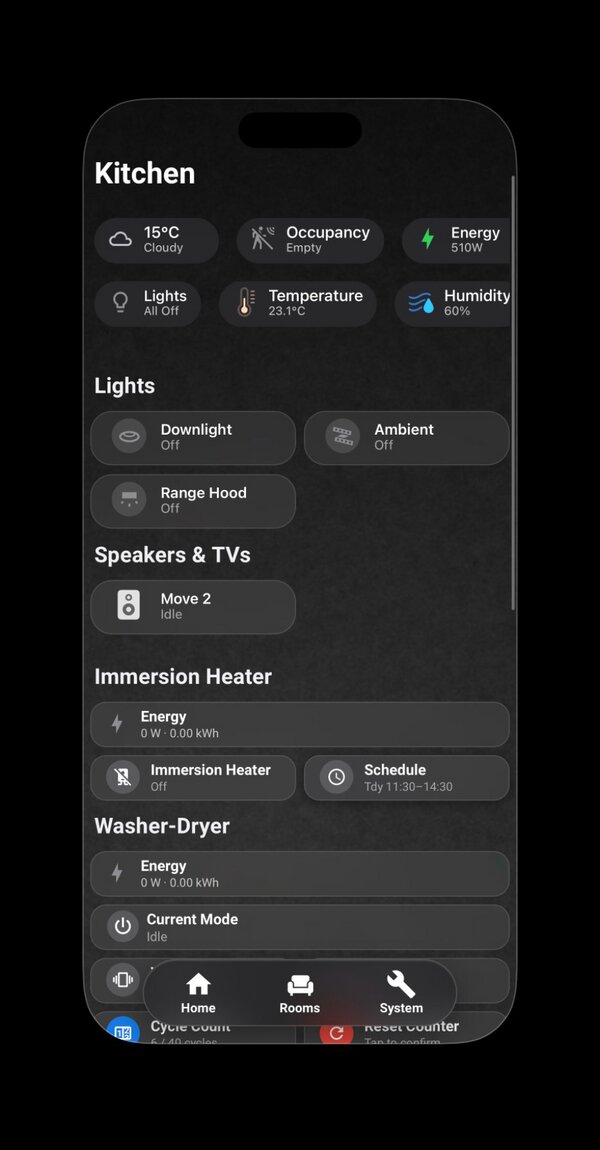
Kitchen view
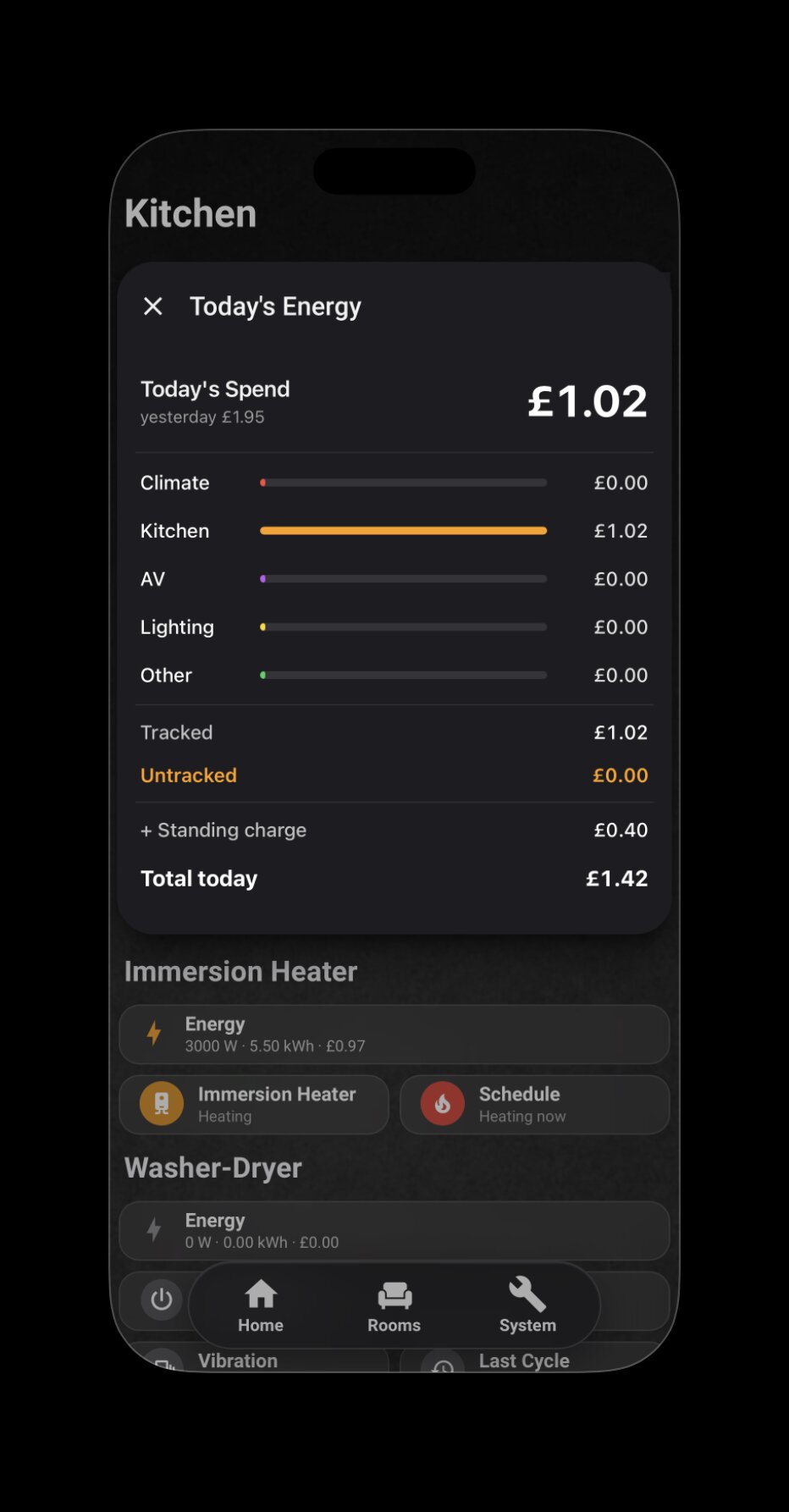
Kitchen · Per-appliance energy, immersion heater scheduling.
Bathroom view
Bathroom · Minimal — the single colour is the one "on" state.
Lounge media section
Media · Sonos Home Cinema, Move 2 grouping, Apple TV.
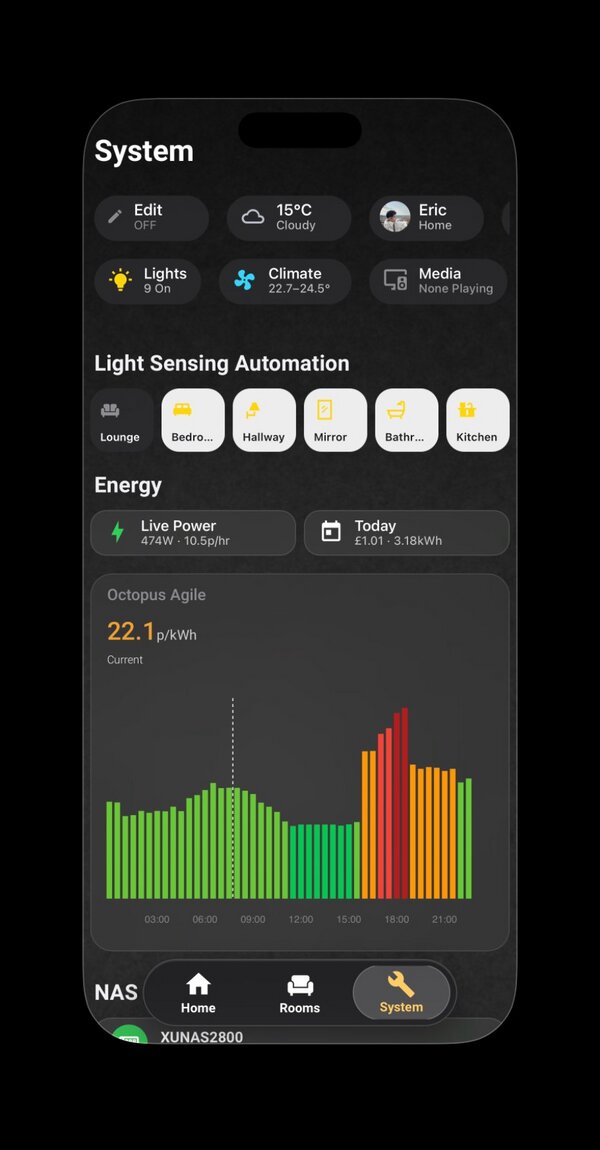
System view
System · Automation toggles, Octopus Agile chart, NAS health.
A Colour is information, not decoration.

Status colours map to Apple HIG semantics — yellow for attention, green for active, red for alert. Lights show their actual RGB output; inactive states are grey. Every coloured pixel earns its place, a discipline that maps directly to commercial lighting scene design. Where two information channels are needed — temperature, for example — colour carries semantic state while shape carries continuous range. Never the same channel twice.

B YAML over UI clicks.

Every view, automation, and template lives in a version-controlled file — reproducible, diff-able, reviewable. The same engineering standard expected on a commissioning project.

C Native gestures over reinvented controls.

Where Home Assistant's native popups work, I use them. Where they don't, I intervene at the shadow DOM level rather than reinvent the control. The Mitsubishi AC popup was deliberately left native — the engineering cost didn't justify the marginal gain. Knowing when not to build is part of the job.

D Depth visible in the details.

A polished surface earns trust; the details under it earn respect. Powercalc models, Adaptive Lighting curves, shadow DOM fixes — the unglamorous work is documented as evidence, not hidden.

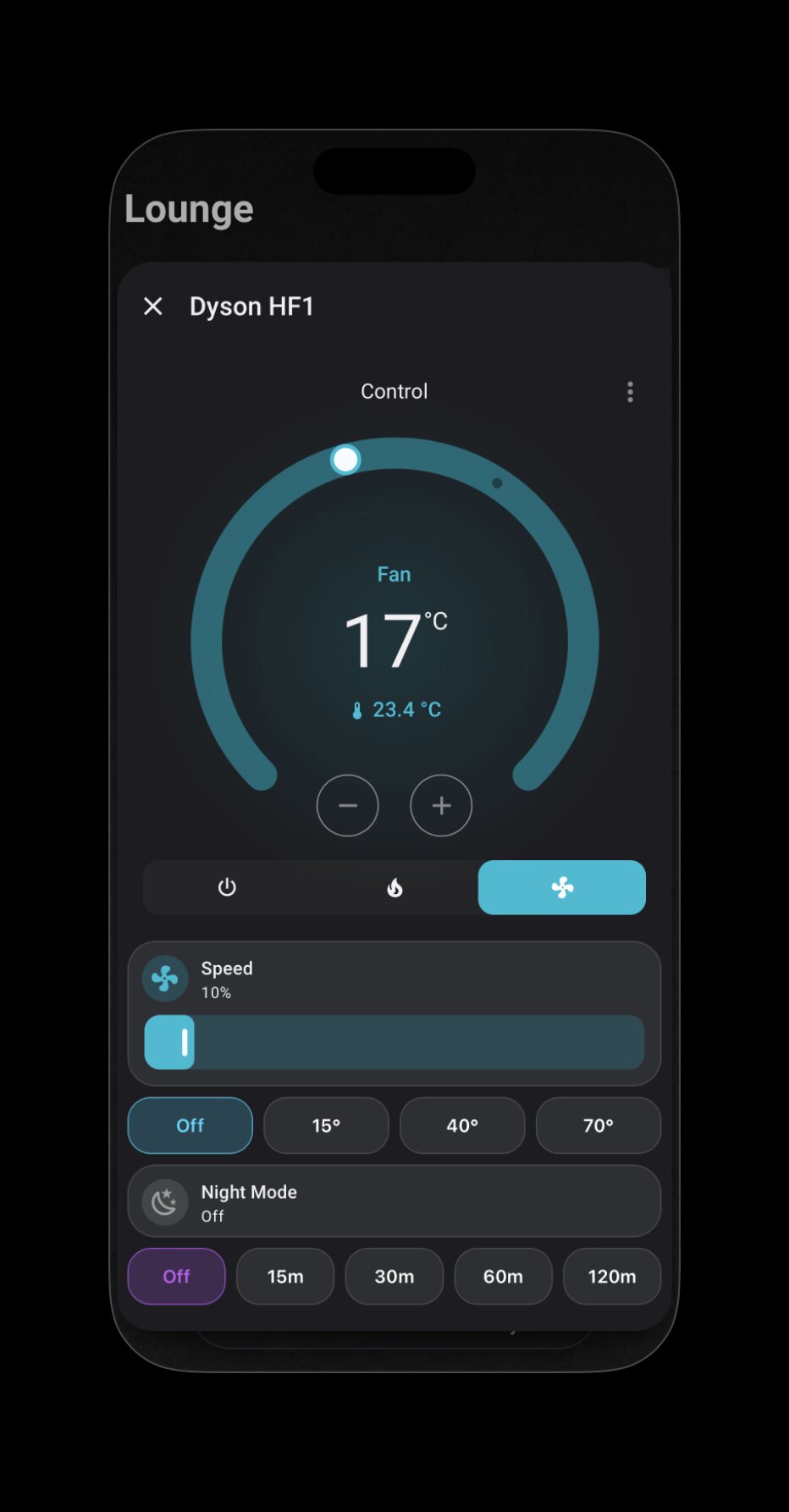
Dyson HF1 custom popup with circular dial, speed slider, oscillation angles, and timer presets

Counterpoint to C

When to build.

The Dyson HF1 popup is the opposite case. The native control couldn't express the things this device actually does — granular speed, oscillation angles, timer modes, night-mode state — without forcing the user through three layers of menus. So this one is fully custom: circular temperature dial, inline speed slider, four oscillation presets, and timer scheduling on the same surface.

Two air-treatment devices in the same home, two opposite decisions. Both are documented; neither is an accident.

Centerpiece Case Study

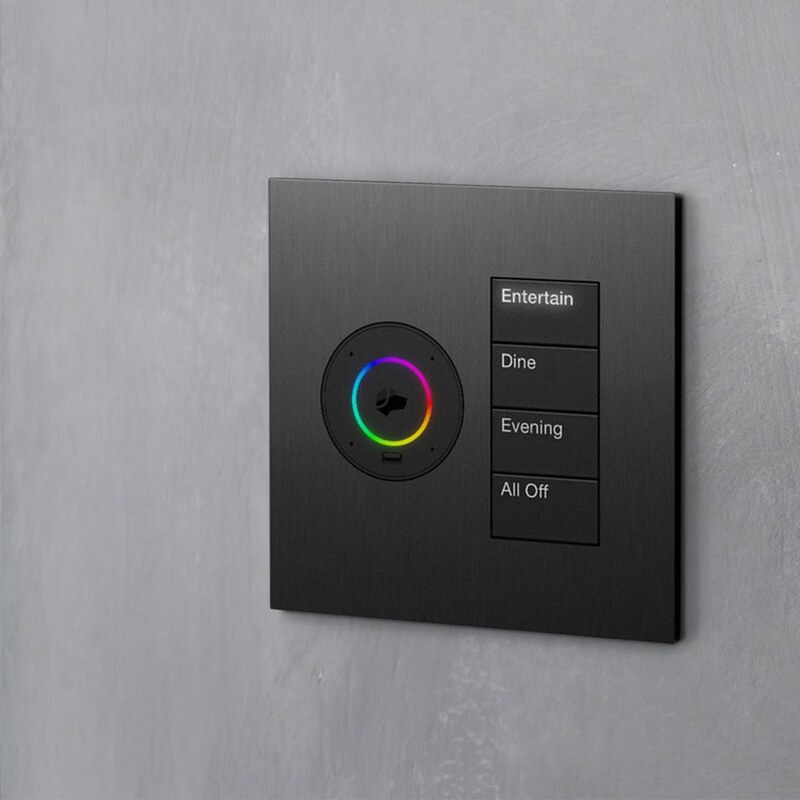
A Lutron-inspired tunable white keypad.

A direct translation of Natural Light principles into a working interface. Five preset scenes spanning the cool–warm spectrum, each bound to a single tap and identified by its own Apple HIG status colour.

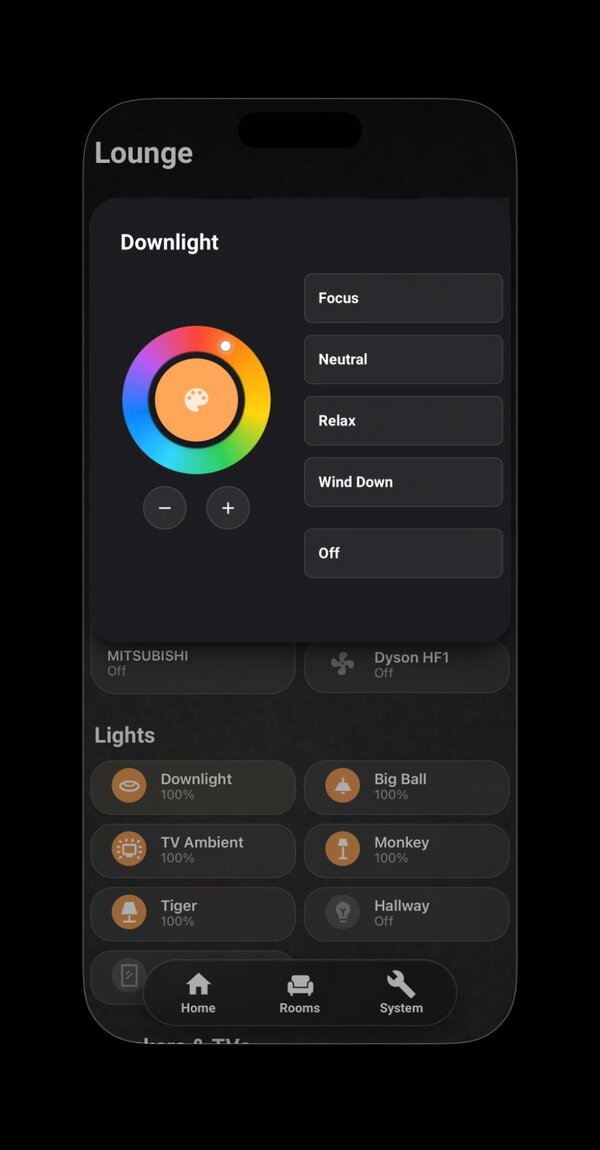
Tunable white keypad popup
SceneKelvinPurpose
Focus4440 KCool work light, daylight-equivalent
Neutral3610 KDefault — daytime balance
Relax2710 KWarm evening light
Wind Down2200 KPre-sleep, melatonin-friendly
Off"All Off", Lutron seeTouch-style separator

Conic-gradient colour ring with dual mapping — hue direct, colour temperature mapped to a 20°–55° angular sub-range. The marker position is computed live from the light's color_mode and color_temp_kelvin attributes.

# Each scene binds one Kelvin value; state template detects active scene
- type: custom:button-card
  template: keypad_btn
  name: Focus
  tap_action:
    action: call-service
    service: light.turn_on
    service_data:
      color_temp_kelvin: 4440
  state:
    - operator: template
      value: |
        [[[ return entity.state === 'on' &&
            Math.abs((entity.attributes.color_temp_kelvin || 0) - 4440) < 100; ]]]
      styles:
        card: [{ background: 'rgba(255,214,10,0.15)' }]
        name:  [{ color:      '#FFD60A' }]

Case Study

Half-hourly pricing, modelled and acted on.

Octopus Agile pricing chart
  • Dynamic pricing, live LIVE

    The UK has half-hourly wholesale electricity pricing (Octopus Agile). I integrated the API to expose 48 forward prices, and built a template sensor that computes the cheapest 3-hour window in the next 24 hours — directly usable as an automation trigger.

  • Whole-home modelling

    Devices without their own meter (hob, oven, fridge, immersion heater) are modelled via Powercalc, then reconciled against the Hildebrand Glow CAD whole-home measurement for drift detection.

  • Load shifting

    The immersion heater runs only inside the cheapest 3-hour window each day, scheduled by automation rather than a fixed timer.

  • Local-first metering

    Glow CAD over MQTT gives 10-second whole-home power, with the full SMETS2 dataset available to the automation layer — no third-party cloud dependency.

Real-World Diagnostic

When the telemetry didn't add up.

Eight months into occupancy, the baseline power never dropped below ~570 W — even with every controllable load off. Here's what happened next.

  1. Sep 2025

    Move-in. Baseline starts logging.

    Whole-home power monitored via Hildebrand Glow CAD from day one.

  2. Dec 2025 – May 2026

    The pattern hardens.

    Idle baseline persistently 500–600 W. Bills consistently higher than modelled. All known loads accounted for; the gap remains.

  3. May 2026

    Total Isolation Test.

    Hot-swapped the gateway and router onto a UPS to keep telemetry live, then cut the property's main breaker. Power should have read zero. It read 5.2 kW — proof an upstream circuit was billing this meter for an adjacent flat's HVAC.

  4. Jun 2026 — early

    Telemetry-led dispute.

    Quantified eight months of overcharge (£487 net) from half-hourly settlement data. Evidence pack circulated to Octopus Energy's senior team and the freeholder simultaneously.

  5. Jun 12 2026

    £850 settlement closed.

    Ex-gratia settlement signed. A separate BS 7671 compliance concern (an HVAC circuit bypassing the main isolation switch) was rectified as part of the remediation.

What this demonstrated

System-level diagnostic thinking — designing a controlled test that isolated the variable, not just reading a sensor. Using technical data as commercial leverage in a stakeholder negotiation. End-to-end ownership from anomaly to settlement, closed in 27 days.

Network Diagnostic

When the router moved and six cameras disappeared.

A network upgrade rebound every device from wired to wireless. Six Reolink cameras and the Frigate NVR went offline. The fix exposed an opportunity to refactor secrets out of plaintext at the same time.

  1. Trigger

    Router swap, DHCP rebind.

    Every connected device — including six Reolink cameras — re-registered on the new subnet. Each got a new IP.

  2. Symptom

    HA Reolink integration stuck "Initializing". Frigate offline.

    The dashboard cameras went grey. Two separate failure modes, one root cause.

  3. Diagnosis 1/3

    IP mismatch surfaces.

    Frigate's config file still pointed at the old camera IPs. Updating those was easy. The harder problem was Home Assistant.

  4. Diagnosis 2/3

    The E1 Pro uses a distinct MAC per interface.

    Wired and wireless interfaces on the same camera report different MAC addresses — which means DHCP reservations by MAC bind to one interface only. Moving from cable to wifi looked, to the network, like a different device entirely.

  5. Diagnosis 3/3

    HA refused to reconfigure: unique_id mismatch.

    This isn't a bug — it's a security feature. Home Assistant binds device entities to a hardware identifier (here, MAC) so that a different device on the same IP can't quietly inherit your automations. Recognising that as protection rather than obstruction changes the fix.

  6. Resolution

    Re-pair + secrets refactor in one atomic deploy.

    Deleted and re-paired the Reolink integration on the new MAC. While inside the Frigate config anyway, refactored credentials out of the compose file into an env_file secrets pattern — eliminating plaintext passwords from both files. A single redeploy injected new env vars, new IPs, and the new MAC bindings together.

What this demonstrated

Network-layer diagnostic thinking. The discipline to recognise that "the integration is broken" was actually "the integration is protecting you". And the instinct to fold an architectural improvement — secrets externalisation — into the same deploy as the incident fix. Zero entity_id changes, zero automation rewrites, zero dashboard churn.

Under the Hood

Automation logic.

Sixty-plus automations run the home. A few that show the level of logic involved.

Multi-sensor presence inference (Bathroom)

PIR for instant trigger, mmWave for presence maintenance, plus a cross-zone occupancy-exclusion template that infers bathroom occupancy from recent activity elsewhere in the home — with a 30-minute fallback timeout so lights never stay on indefinitely. Four trigger paths handled in one mode: restart automation.

Washer-dryer state machine

A vibration sensor drives a multi-stage state machine: double-shake confirmation to filter transient noise, a 20-minute refractory period to skip internal baseline cycles, and a debounced 5-minute checkout to detect true cycle end. On completion, it increments a cycle counter and fires a predictive-maintenance alert at 40 cycles.

Energy-arbitrage notifications (Octopus Agile)

When wholesale prices turn negative, an automation parses the API's forward window, applies a 2-minute debounce to filter transient dips, and pushes a notification telling me exactly when the negative-price period ends — so high-draw appliances can be run while being paid to consume.

Tech

Built with.

Smart Building & Lighting

KNX (ETS6) — Partner Certified · Adaptive Lighting · tunable white scene logic · Lutron-style keypad UX · Apple HomeKit

Home Assistant Layer

Home Assistant Core · YAML · Lovelace Sections · button-card · card-mod · browser_mod · Mushroom · ApexCharts

Protocols & Integrations

Zigbee2MQTT · MQTT (Mosquitto) · SmartIR · Broadlink IR · Sonos · Music Assistant · Octopus Energy API · Hildebrand Glow CAD (SMETS2) · Powercalc · Reolink · Frigate NVR

Infrastructure

UGREEN NAS (Ubuntu VM) · Docker · Eaton UPS via NUT · Cloudflare Tunnel · Cloudflare Pages · GitHub · VS Code · Chrome DevTools (shadow DOM)